Have you ever wondered why so many small business owners and accountants still rely on Excel, even with advanced accounting software available today? The answer is simple: Excel accounting offers flexibility, accessibility, and a low-cost way to manage financial data. While Excel might not have all the bells and whistles of modern accounting platforms, it remains a powerful tool for bookkeeping and financial management, especially if you know how to use it effectively.
In this guide, we’ll explore what Excel accounting is, why it matters, how accountants use it, and step-by-step instructions for setting up your own spreadsheets. By the end, you’ll understand both the benefits and limitations of Excel for accounting, plus when it might be time to switch to more advanced tools like Otto AI Accounting Software.
What Is Excel Accounting?
Excel accounting refers to using Microsoft Excel to record, organize, and analyze financial data. It can be used for:
- Bookkeeping (tracking expenses and income)
- Preparing financial statements
- Budgeting and forecasting
- Creating invoices and receipts
- Reconciling accounts
Unlike dedicated accounting software, Excel doesn’t come with pre-built accounting automation. Instead, you create your own templates, formulas, and reports tailored to your needs.
In short: Excel is like a blank canvas for accounting. It’s flexible and customizable, but it requires more manual setup and ongoing attention.
Why Do Businesses Use Excel for Accounting?
Even though advanced solutions exist, Excel remains a go-to tool. Here’s why:
1. Low Cost
Excel comes bundled with Microsoft Office or can be accessed via Microsoft 365 subscriptions. Compared to software, it’s much cheaper.
2. Familiarity
Most business owners already know how to use Excel at a basic level, no extra training required.
3. Flexibility
You can customize spreadsheets to your exact needs, whether for expense tracking, cash flow, or payroll.
4. Accessibility
Excel files can be shared easily across devices and teams. With cloud storage (like OneDrive), multiple people can collaborate on the same file.
5. Control
Unlike automated software, Excel puts you in the driver’s seat. You decide what to track and how to calculate it.
Common Uses of Excel in Accounting
1. Bookkeeping
Using Excel for bookkeeping allows you to record transactions like income, expenses, and bank transfers. For example:

2. Financial Statements
You can prepare simple versions of:
3. Budgeting
Excel helps you compare planned vs. actual expenses.
4. Payroll Management
Track salaries, tax deductions, and net pay.
5. Invoicing
Many small businesses create invoice templates in Excel. Learn about invoice payment terms for better organization.
How Do Accountants Use Excel?
Professional accountants rely on Excel in several ways:
- Data Analysis: Using pivot tables and charts to spot trends.
- Financial Modeling: Building forecasts and projections.
- Audit Support: Organizing transaction records for compliance.
- Reconciliations: Matching bank statements with ledger records.
Excel’s formulas (like SUM, IF, VLOOKUP) make it a powerful tool for accounting calculations.
Read More: AI in Accounting: Practical Applications, Trends & Tools
Step-by-Step: How to Use Excel for Accounting
Here’s a beginner-friendly walkthrough:
Step 1: Set Up Your Chart of Accounts
Create categories such as:
- Assets
- Liabilities
- Equity
- Revenue
- Expenses
This structure forms the foundation of your bookkeeping.
Step 2: Record Transactions
Each entry should include:
- Date
- Description
- Category
- Debit/Credit amount
- Balance
Step 3: Create Financial Reports
Use formulas to sum up income and expenses, then build:
- Profit and Loss Statement
- Balance Sheet
- Cash Flow Statement
Step 4: Automate with Formulas
Examples:
- SUM: Add up total expenses.
- IF: Categorize expenses based on conditions.
- VLOOKUP: Pull data from large tables.
- PivotTables: Summarize and analyze transactions quickly.
Step 5: Visualize Data
Add charts to track revenue growth or expense trends.
Advantages of Excel Accounting
- Customizable: Tailor spreadsheets to fit your unique needs.
- Scalable for beginners: Perfect for startups or freelancers.
- Powerful analysis tools: PivotTables, charts, and formulas.
- Integration: Easily import/export CSV files from banks or software.
Limitations of Using Excel for Accounting
Despite its strengths, Excel has drawbacks:
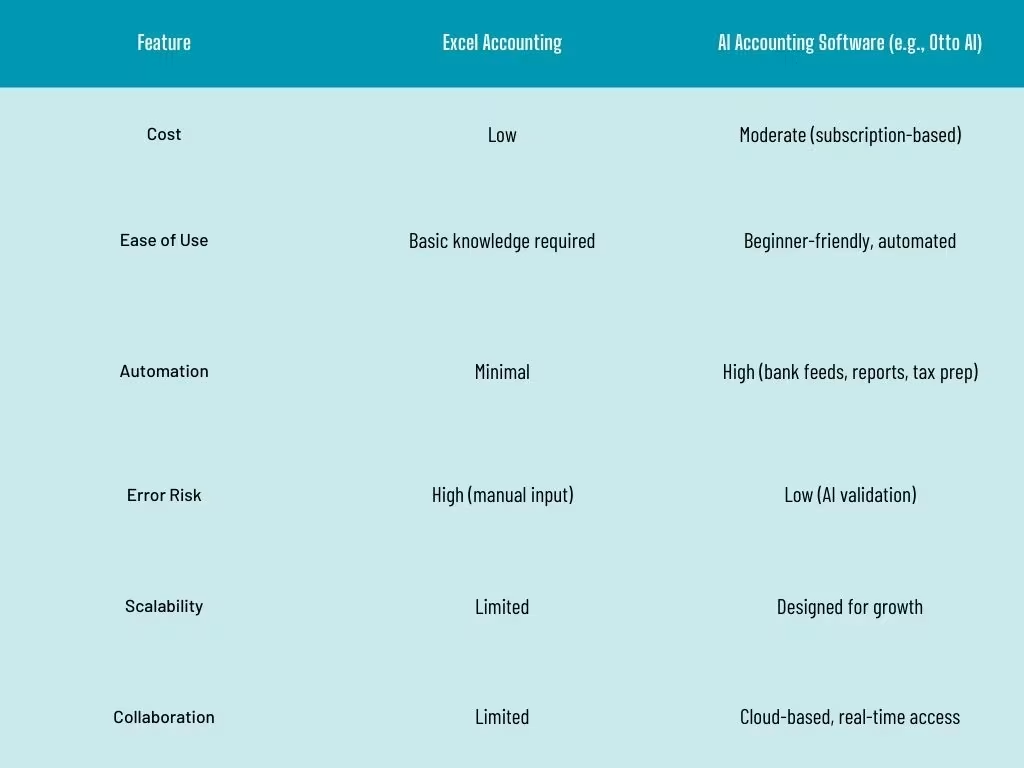
- Time-Consuming
Manual data entry takes time and increases the risk of errors. - Error-Prone
One small formula mistake can throw off your entire financial report. - Limited Collaboration
While sharing is possible, Excel isn’t built for real-time, multi-user accounting. - Lack of Automation
Unlike AI accounting tools, Excel doesn’t automate tasks like reconciliation or report generation. - Security Concerns
Sensitive financial data stored in Excel may be vulnerable without encryption or secure storage.
Excel vs. Modern Accounting Software
Real-Life Example: Using Excel for Small Business Bookkeeping
Imagine you’re a freelance graphic designer. You set up an Excel sheet to:
- Record invoices sent to clients
- Track software subscriptions
- Monitor bank transactions
At tax time, you create a Profit and Loss Statement by totaling your income and expenses. While this works well at a small scale, as your client list grows, Excel becomes harder to manage, prompting you to upgrade to software like Otto AI.
Tips for Making Excel Accounting Easier
- Use templates: Start with free Excel bookkeeping templates.
- Learn essential formulas: SUM, IF, VLOOKUP, INDEX-MATCH.
- Create separate tabs for income, expenses, and reports.
- Back up files regularly.
- Use data validation to prevent entry errors.
When to Switch From Excel to Accounting Software
Excel is great for beginners, but you may need to upgrade when:
- Your business grows and transactions multiply.
- You need automated bank feeds.
- You require real-time collaboration.
- Tax reporting becomes too complex.
- You want AI-driven insights for better decision-making.
At this point, platforms like Otto AI can save you time and reduce accounting headaches.
Conclusion
Excel accounting remains a valuable tool for startups, freelancers, and small businesses who need a flexible, low-cost way to manage their finances. By setting up spreadsheets properly and using formulas, you can handle bookkeeping, financial reporting, and even budgeting.